
Implementation Spotlight Deals
Spotlight Deals
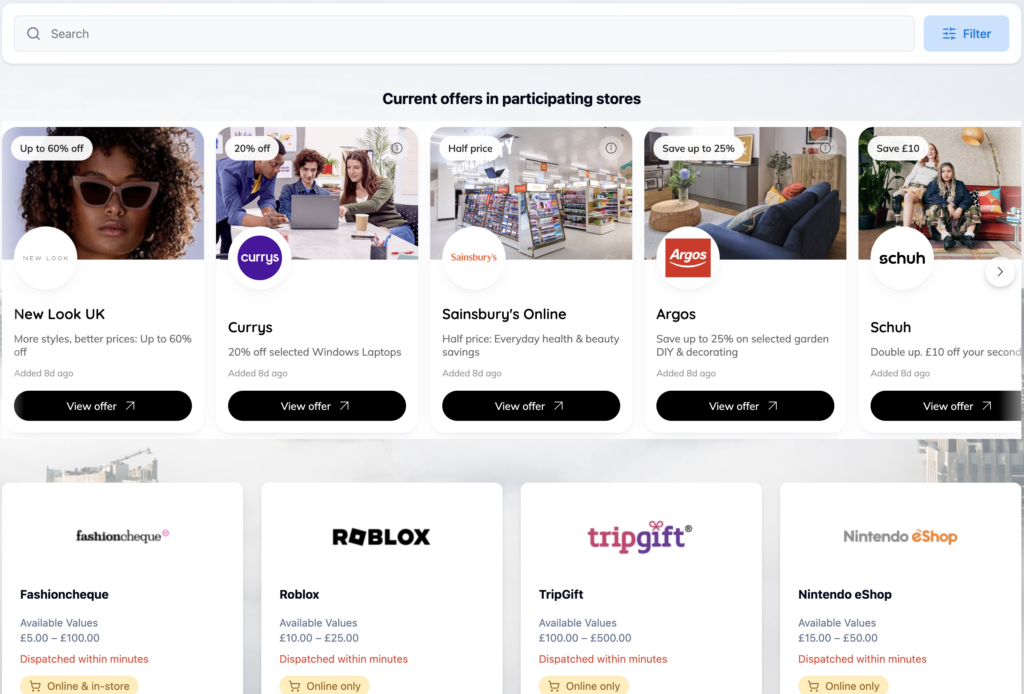
Managed promotion campaigns, live above your catalog
What it is
A fully managed promotional campaign tool on your platform: merchant-specific, tested, and curated around the merchants that contribute most to your revenue. Activating Spotlight Deals delivers value to your users and generates more revenue for your organization as well as for your merchants.
Good to know
- Only promotions of brands in your catalog are shown.
- We source, validate and refresh every offer, nothing is scraped and nothing expired reaches your users.
- Placement is weighted toward the merchants that matter most to your revenue.
- We style it to match your platform and set it up in your language.
- It’s a drop-in snippet that runs in an isolated iframe, so updates and maintenance never require action on your side.
Commercial value
Some merchants give you a high margin, some low. Spotlight Deals puts the strongest deals from your most profitable brands in front of users at the exact moment of choice, lifting conversion where it is worth the most. The extra exposure also gives us the performance evidence to negotiate better affiliate commission rates with those merchants on your behalf.
Implementation
Live in under an hour!
We issue a snippet unique to your platform: one line in your page’s head, one where you want the deals to appear. It works anywhere on the page, but we recommend directly above your catalog where it gets the most attention.
No development project and no design work. We manage the content from day one, so there is no ongoing maintenance on your side.
					<!DOCTYPE html>
<html>
  <head> <script src="https://www.giftomatic.io/dist/sd_embed.js"></script> </head>
  <body>
    <giftomatic-promotions dataset="KADONATION_BE"></giftomatic-promotions>
  </body>
</html>
Also add the following to your page’s Content Security Policy:
default-src 'self' https://www.giftomatic.io; frame-src 'self' https://promotions.giftomatic.io;
What we need
Content
Spotlight Deals only shows brands you already carry, so we need your current catalog or brand list to match offers against it. Alongside that: your market and language, and a couple of merchants your commercial team wants to be excluded.
One technical contact on your team to place the snippet, and that’s it.