
Implementation Guide
Step 1: Implement Giftomatic Links
Giftomatic Links
We’ll prepare an online sheet where you can find the links that Giftomatic has created for all your merchants – per platform per country.
Explanation how these links work
To monetize (via our affiliate network) any outgoing links to retailers you can use the following prefix URL. This link can be used for the “Thank You” or “Confirmation” page or in the emails etc.
https://www.giftomatic.io/out?dataset=KADONATION_BE&url=
After the prefix you add the URL of the webshop/redemption partner: https://www.example.com. This URL needs to be encoded. You can easily encode URLs through this website: https://www.urlencoder.org/, but note that the URL’s we’ll prepare for you are already encoded by us.
Examples:
					https://www.giftomatic.io/out?dataset=KADONATION_BE&url=https%3A%2F%2Fwww.adidas.be%2Fnl

https://www.giftomatic.io/out?dataset=KADONATION_NL&url=https%3A%2F%2Fwww.bever.nl
Important Touchpoints
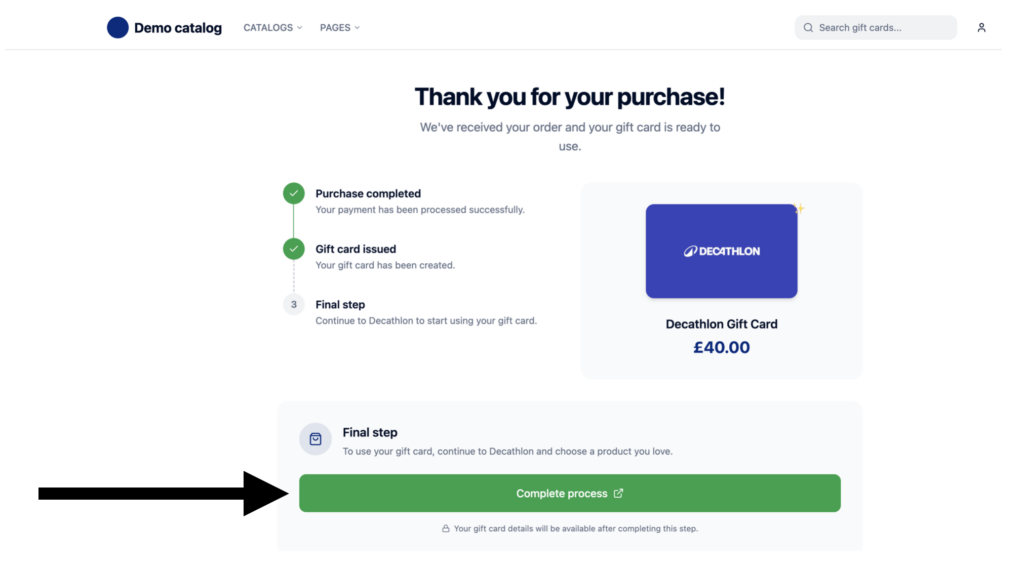
1. Add link to the thank you / confirmation page
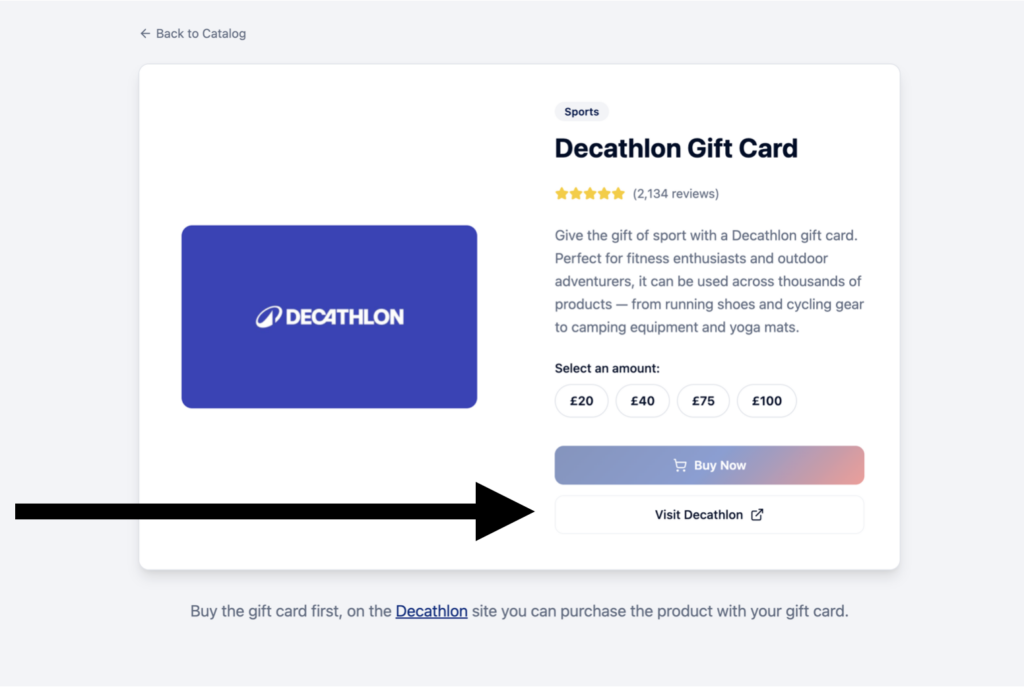
2. Add link to the catalog
Step 2: ShopStarter
Generate clicks from the wallet
What it is
ShopStarter automatically opens the merchant’s website in an inactive tab when the user clicks the CTA button. Because it’s triggered by a real user action, browsers allow it through natively. The click always lands and the user can immediately start shopping.
Good to know
- The tab opens behind the current page, so the user never feels interrupted or pushed
- A 30-day attribution window starts on that device – the user doesn’t need to buy immediately
- If the user returns to the original tab within 8 seconds (configurable), the redirect won’t trigger. Please note that the demo does it instantly.
- Works on both mobile & desktop
Commercial value
The thank-you page is the highest-intent moment in the gift card lifecycle. ShopStarter captures it automatically – no follow-up needed. More clicks, more commission. In our experience this is a powerhouse touchpoint.
How it looks
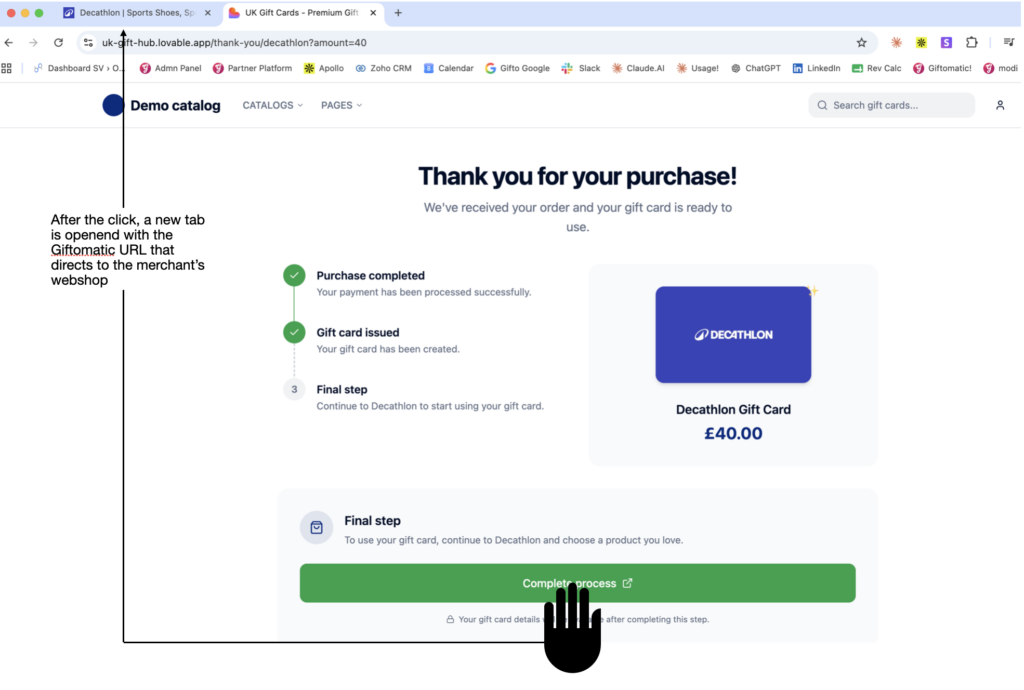
Wallet clicks
To activate the ShopStarter in your wallet, you can install our NPM package.
Giftomatic has built this package for our partners to easily activate this feature and ensure that it works in all browsers and devices.
After installing the package, you can simply add an extra clickunder attribute to links <a href> in your website, and the javascript snippet will automatically pick these up.
How it works
When the user clicks the link to view their gift card details, two things happen simultaneously.
New tab: the voucher code page opens – the user sees their code and can copy it straight away.
Original tab: after 8 seconds (configurable), it automatically forwards to the retailer’s website so the user can start shopping. If they return to this tab within that window, the forward won’t trigger.
Step 3: LinkOptimizer
Automatically convert links on your gift card pages into Giftomatic links
What it is
This tool automatically converts the links to retailers into Giftomatic links.
Good to know
- In case a new merchant is added, Giftomatic will automatically detect this. No need to communicate with us.
- Links always work thanks to our daily checks
- The user will not notice this tool
- LinkOptimizer works on text links and HTML buttons. For CSS buttons, Giftomatic links need to be inserted directly.
Commercial value
The more clicks you send, the more commissions will be generated. The gift card productpage is a great place to activate the Giftomatic links.
Why
Because:
When using the Giftomatic prefix links you can rest assured that the user will reach the website he intends to visit.
It will work in any situation, for example when:
- The site is active as affiliate
- The site is NOT active as affiliate
- The link is a deeplink
- The link is an internal link
Every night our tools check every link. In case there is an issue, we receive a notification and it will be immediately fixed.
Retailers sometimes switch from network. Sometimes they stop with affiliate marketing or they become active.
Giftomatic will make sure that the highest number of merchantes will be monetized.
Some retailers use multiple types of affiliate links with different commission structures. Giftomatic chooses the best performing links with the highest commission.
Is a new merchant added to your the catalog? Giftomatic will detect this and will start monetizing the link from day 1. There’s no need for communication between your team and Giftomatic.
Activate the linkoptimizer
To activate the linkoptimizer, insert the Linkoptimizer Javascript in the <HEAD> of every page of the platform (or at least the gift card pages). Make sure the code is contained before the closing </head> tag
This code will make sure that all outgoing links will be redirected through an affiliate link.
					<script>var optmz = optmz || [];
  optmz.push({
    client: "KADONATION_BE",
    excluded: ["domain.com", "example.com"]
  });</script> <script async src="https://www.giftomatic.io/dist/linkoptimizer.js"></script>
Important: Make sure outgoing links are not styled as a CSS button as our Linkoptimizer cannot track these.
Optional: exclude links
If you would like to stop Giftomatic from affiliating specific links, you can also use the class “no-optmz” on the link itself.
<a href="https://giftomatic-merchant.com"> Affiliated link </a>


<a class="active no-optmz etc" href="https://giftomatic-merchant.com"> Non-Affiliated link </a>